From Conversation to Checkout: How to Close a Booking From the Chat
Most travel journeys that start in a chat end somewhere else. The assistant finds an activity, the traveler gets a link, and the booking happens, or doesn't, on a page the assistant has no control over.
That handoff is expensive. Every extra page, form and redirect loses people. The better approach is to make the handoff short: a pre-filled checkout with the activity, date and group size already chosen.
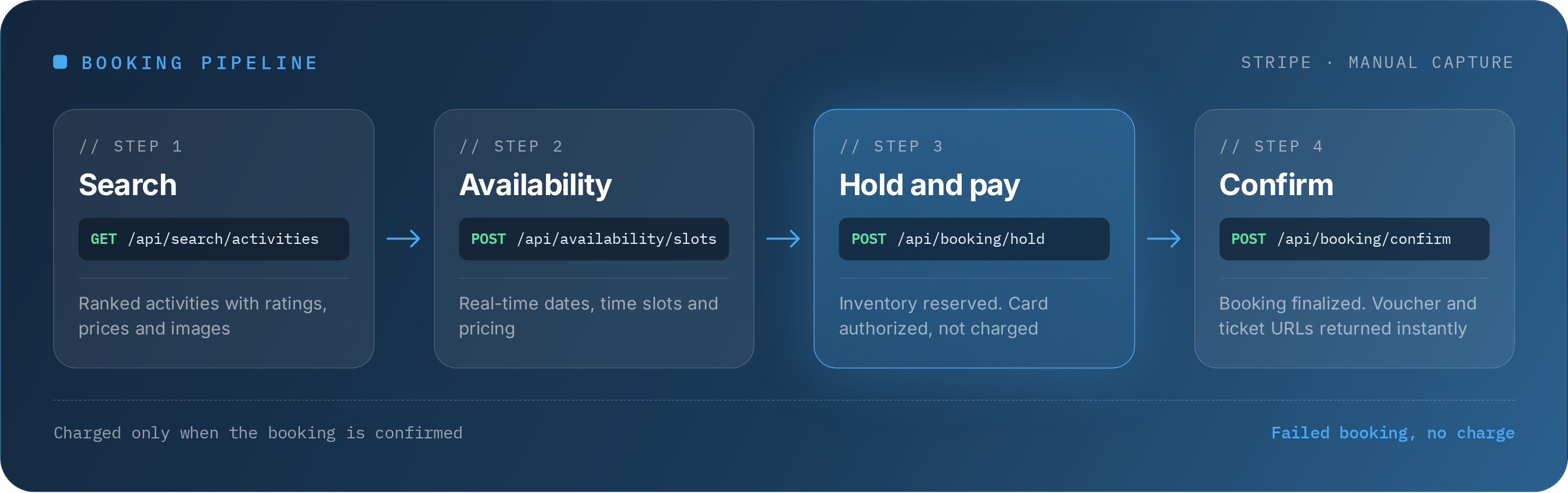
The booking pipeline in four steps
The TourScanner API covers the whole path from search to confirmed booking:
- Search. GET /api/search/activities returns ranked activities for a city, with ratings, prices and a thumbnail image.
- Check availability. POST /api/availability/slots returns real-time dates, time slots and pricing.
- Hold and pay. POST /api/booking/hold reserves the inventory and creates a Stripe checkout. It needs details from the chosen slot and the traveler's contact details, and returns a checkoutUrl. The traveler pays on that Stripe page.
- Confirm. POST /api/booking/confirm, with the session_id Stripe returns to your site after payment, finalizes the booking and returns voucher and ticket URLs when the supplier provides them.
The same four steps apply whether the booking starts in your app, on your website or in an AI agent you build on the REST API. They work for activities from our connected suppliers; other activities link to the supplier's own booking page.
How payment works
Payment runs through Stripe with manual capture. This is worth understanding, because it shapes the customer's experience:
- When the traveler pays at checkout, the card is authorized: the funds are reserved, not taken.
- When the booking is confirmed, the payment is captured.
- If the supplier rejects the booking, the authorization is released and the customer is not charged.
For travelers, that means no charge for something they didn't get. For your support team, it means fewer refund requests and disputes caused by failed bookings.
What you don't have to build
Without a unified pipeline, adding checkout to an activities offer means:
- Handling payments separately for each supplier
- Reconciling confirmation formats and voucher delivery
- Managing failure cases between payment and supplier confirmation
With TourScanner, those steps are part of the API. Your job is the interface and the experience.
Designing the experience
A few principles help the booking feel as natural as the conversation that led to it:
- Confirm the details back. Before the hold, show the activity, date, time slot, group size and total price in one place.
- Check availability late. Re-check slots when the traveler is about to commit, so what they see is current.
- Show the result as soon as it arrives. Voucher and ticket links come back with the confirmation when the supplier provides them (some arrive a little later; check the booking status), so display them in the chat or in the app and send them by email as well.
- Explain the payment. A short line such as "you won't be charged until your booking is confirmed" reduces hesitation.
In an AI agent
The TourScanner agent searches, checks live slots and prepares a checkout link within one conversation; the traveler pays on the checkout page. If you build your own agent on the REST API, it can run the full hold-and-confirm pipeline. The remote MCP server with 12 tools gives your assistant search, availability and checkout links.
The result
A traveler asks a question, gets a real answer, picks a time and moves straight to a pre-filled checkout, then has a confirmed booking with a voucher in hand. That is the difference between an assistant that talks about travel and one that sells it.
To see the flow in action, try the agent on tourscanner.ai. To build it into your product, request API access.